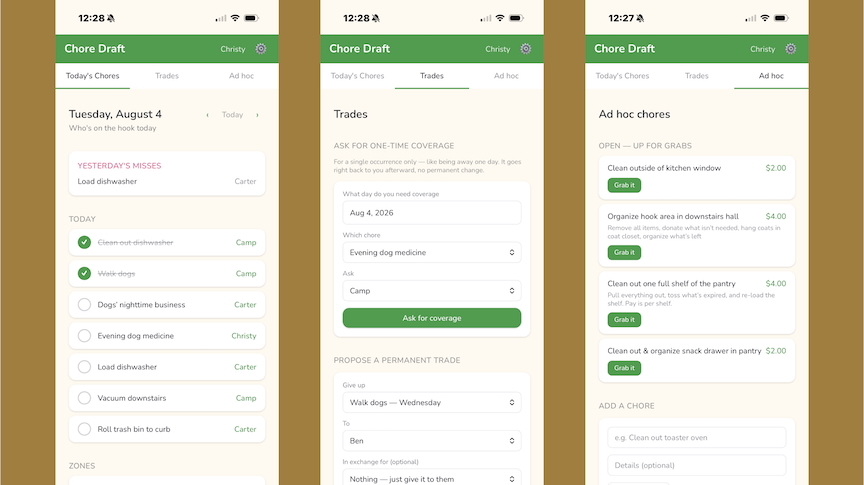
TLDR: Household managers, frustrated moms, detail-oriented dads, and audacious aunties - access chore-draft.christysehl.com to help beta-test the web app I ideated, generated product requirements for, coded (with help from AI!) tested, continuously improved, and launched!
For about 10 years now, we have managed our household chores via a Chore Draft. I've process-engineered not just the draft & trade process, but also automated the reminders to complete chores, added in ad-hoc chores, and allowed for requests for chore coverage! This was an app I built because I wanted to know if could - but it’s been very helpful in my house, so I updated it to be something others can use (which brought a whole slew of privacy learnings, new requirements, and other fun things).
If you have a household that includes two or more people that all have their own device (tablet, phone, etc), and you want to simplify the answer to “who’s on the hook today?” - consider trying out this new tool.
Note: it is not (yet?) available via the app store - you can add it to your device to make it work like an app by tapping the share icon, then selecting “add to home screen.”
What's a chore draft?
A chore draft is based on the concept of a sports draft - participants take turns “drafting” various chores/accountabilities based on their availability, personal preferences, and circumstances. A participant can propose a trade with another household member, which would need to be accepted by the commissioner.
At the end of a draft, each participant ends up with an easy-to-view list of what they are accountable for each day/week/month so that the house stuff gets done consistently (and, hope of hopes, with less nagging).
This idea has worked wonderfully for my family for at least 10 years - but it was long overdue for an update.
How do I know what chores to add?
You have to invest some time up front to determine what chores make sense for your house - no need for someone to mow the yard if you live in an apartment, but it’s very important that someone scoops the litter box if you have a cat! Take into account the ages & maturity of your family as you do this - you may need to help the youngest kids pick, and you may need to steer the oldest kids away from the easier chores to allow the littles to participate. I also add in adult chores - like “Pay the bills,” “Plan menus for the week,” “Grocery shop,” etc - this way, adults can model participation and contribution.
Each chore will get one of three designations:
- Daily: things that need to be done every day of the week - think feed dogs, wash dishes, give the cat medicine, etc
- Weekly: things that need to be done on specified days each week - think roll the trash can to the curb on Tuesdays, vacuum the downstairs on Mondays & Thursdays, wipe the cabinet fronts on Wednesdays, etc
- Zone: things that need to be done when they need to be done, but not on a set schedule. Think mowing the yard, taking out the kitchen trash, taking recycling to the outside bin, etc.
How does it work?
At a high level, after you determine what chores need doing, every member of the household takes turns drafting chores into their schedule. In the app, this is set up as a snake draft (order is 12344321) to maximize fairness. Commissioners can skip turns, pick for people, etc - but the idea here is that everyone gets a say in what chores they are accountable for each day.
This used to be an arts & crafts project - I would print out documents for each family member to be their weekly calendar, then print out a carefully measured table listing each chore, cut up this table into individual cells, which the family would gather around and take turns picking up little pieces of paper. At the end, we would have a brief “trading period” where everyone could make swaps, then we would whip out the glue sticks and paste each chore onto the weekly calendars. If you would prefer to take this approach - I created a guide here.
In my house, we do this about once every three months to keep things fresh and fair. Families can choose whatever frequency works best for them. Lately, my kids are using the app for trades and asking that we skip a whole new draft, which feels like a good sign!
Can I try it out?
Heck yes! If you’ve read this far, you’re my people. Go to chore-draft.christysehl.com to create your family account!